
In this manual, we will consider where and how to view the purchased Microsoft Office licenses, as well as how to download them from the Microsoft personal account. You will be able to view these licenses only if the licenses you activated were linked to a Microsoft account. Not all license deliveries have this property.
You can purchase Microsoft Office licenses at the lowest prices and with instant delivery in our online store:
— Our catalog Microsoft Office for Windows
— Our catalog Microsoft Office for Mac
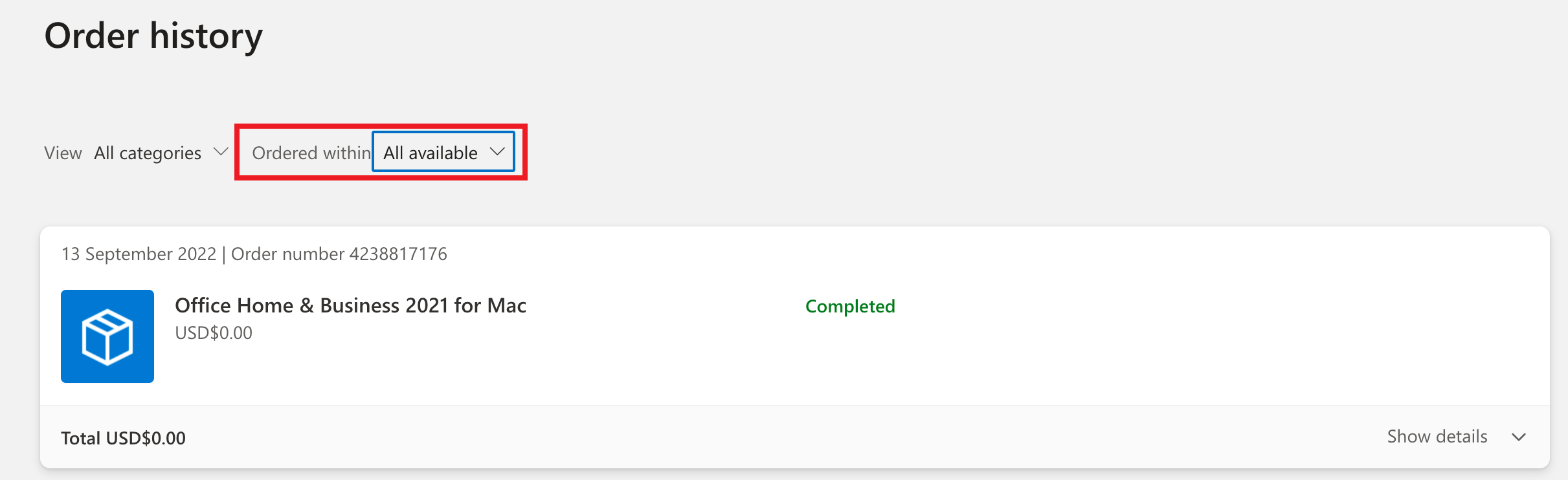
1) You can view the purchased licenses at the following link: https://account.microsoft.com/billing/orders/
(Select «All available» from the drop-down menu).
2) You can download already activated Microsoft Office licenses from the Microsoft website, taking into account that you had a license linked to your account on the following page: https://account.microsoft.com/services
Click «Install» to download.