This article discusses a malfunction in Microsoft Office, specifically in Word, where hotkeys for copying and pasting text or images do not work. When the copy (Ctrl + C), paste (Ctrl + V), and cut (Ctrl + X) functions do not work in Microsoft Word, it can be frustrating.
This problem is easily fixed:
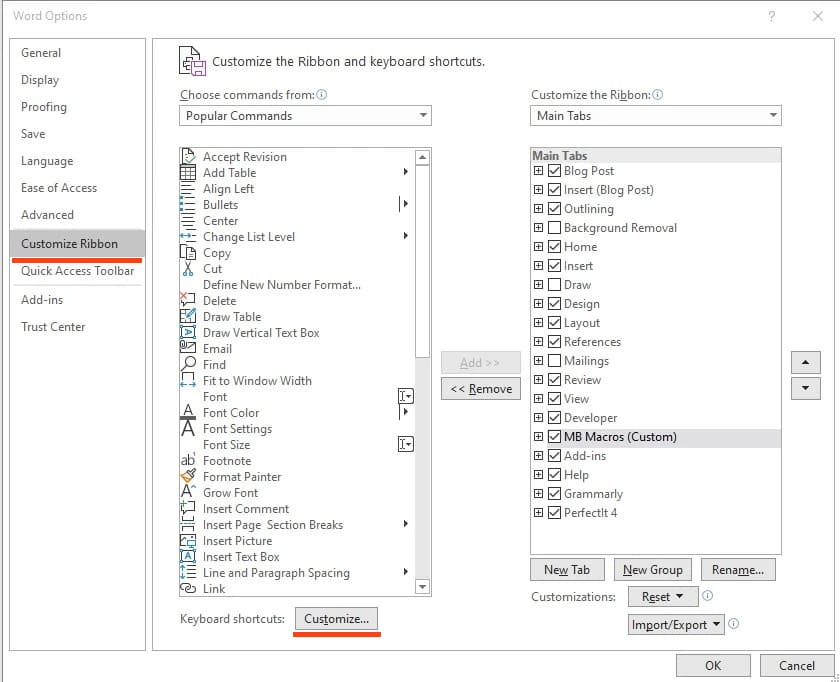
1) Open Word => go to the “File” menu => Options.

2) On the left, select “Customize Ribbon” => Then at the bottom click “Customize.”
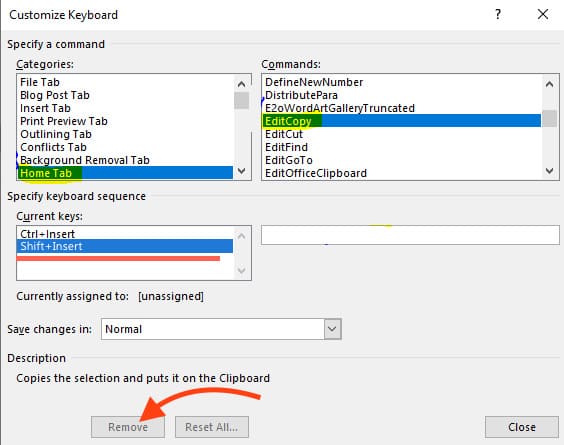
3) Click on the “Home” tab in the left column, and on the right, sequentially search for the tabs – EditCopy, EditCut, and EditPaste. When you find the desired tab, for example, “EditCopy,” at the bottom, select the unnecessary key combination starting with Shift and click “Remove.”
That’s it, the hotkeys for copying, pasting, and cutting in Word should now work correctly.